
BLOG - Page 7 of 7 - GlobalSQA

Difference Between Test Cases and Test Scenarios
This article isn’t only going to cover Test Cases Vs Test Scenarios but it will cover following:
- Real Time Examples
- Conditions for Documenting Test Cases
- Test Case And Test Scenario Example
- Difference Between Test Cases And Test Scenarios
- Conclusion of this Post
Few years back, when I was working in an MNC and dealing with a testing project, I suggested my colleagues to document the test Scenarios instead of test cases. Can you imagine, their reaction amazed me as they all were staring at me all together, I could not argue. It was like I have made a big mistake in my life. Everyone’s opinion was same except mine. They prefer to follow the traditional method of writing Test Cases and not Test Scenarios. Those who are newbies in this field might get confuse with the word Test Scenarios and Test Cases. This article will clear all doubts about it by giving real time examples and explanation.
Few years later, I Switched to another company and handled a testing project which was based on searching and generating different reports with the help of different menu options. We in a team were discussing about the project and how we can proceed with that? Actually, client wanted that project early and we were having deadline to complete the project. Considering my last experience about suggesting the documentation of Test Scenarios, I kept quiet and thinking of other idea. Suddenly, one of my colleagues raised his voice that “We should prepare Test Scenarios in a document”. This time, everyone was quite satisfied with his idea and we further started preparing the Test Scenarios. The conclusion of both cases suggests that preparing the Test Scenarios and Test Cases depends on the urgency and requirement of the project. Generally, in companies, test cases are prepared rather than documenting test scenarios.
Test Cases are replaced with Test Scenarios
As we all know nothing is permanent and with this concept, the software industries and their processes are also changing with time and cost constrains.
V-models and waterfall models which are considered to be traditional models are being replaced by iterative and agile models. In every testing project, document is indeed essential but to complete the project fast within the deadline and to make the process transparent and easy, the way of documentation is changed these days.
Following conditions are applicable for documenting Test Cases:
- Client may ask for the same as part of his project
- No Time constrain(But, I don’t think, it’s possible)
- When software testers are fresher and new to the product.
- When there is Company policy (I strongly have faith that it can be altered)
One of my experience will give you clear picture.
I was handling one of the testing projects from fortune 500 company and they didn’t give us any deadline to complete the project. That mean we were having flexible timelines to complete the project. We were already having template of test cases, and with the help of that we prepared the test cases and it got approved from client as well.
Once the development team finished their module, they were giving us to test it and most of our duty was to follow 100 test cases in a day. We used to document with pass/fail result, further sending it to the client at the end of the day. The project was really big and had different modules within it. To do the same process of documenting the test cases was a monotonous work for some of my colleagues. But at the end of the day, the company was generating revenue from it.
During the project, we had one break where we were not having any task of documenting the test cases. We were having a good time and I was discussing about new ideas and techniques so as make improvement in the existing test cases. I have found during that discussion that none of my colleague was interested in implementing those new ideas and techniques as they thought all the test scenarios is been covered already while making huge amount of test cases. No one was really interested in putting the efforts for new techniques as it a human mentality that we do not want to rework once the work is done. Our mind automatically stops making any efforts for any new ways and techniques for the past work. Same had happened with my colleagues and they just wanted to relax on that certain day.
It is also a fact that in IT companies, most of the testers follow the mechanical process of making the test case and no one really makes effort to make additional test case for the existing one? The same might have also happened with you, if I am not wrong.
Another experience:
While extensively involved in a team challenge activity, we were having a discussion and asked the team members to prepare the test scenarios for the product. We have all started to make the test scenarios and there was not a specific document where we would literally fill expected result and pre-condition for each test case. At the end of the day, we have collected almost 50 test scenarios and it was indeed a great experience while proceeding with that project.
Below example will make picture more clear:
Assume that you are having your website and it has features like username, password, and login page along with cancel button. If you were asked to write the test cases for the above features then your test case may exceed 50 and if you would ask to write the test scenarios, then it will be just a matter of lines. Below explanation will give you the exact idea about test scenario.
High Level Scenario: Login Functionality
Low Level Scenarios:
- To check Application is Launching
2. To check contents text on login page
3. To check Username field
4. To check Password field
5. To check cancel button and Login Button functionality
As we all are at short of time, test scenarios just acts as pain killer spray rather than that old time IODEX. And still the effect is same in both the case.
Finally, I would like to summarize difference as below:
Test Cases |
Test Scenarios |
|
| What it is => | A concept which offers complete info what to test, steps to be taken and expected result of the same | A concept which offers one-line info about what to test. |
| It’s about => | It’s more about documenting particulars. | It’s more about rational and conversing particulars. |
| Importance => | It’s significant when testing is off shored and development is onsite. Writing test cases with particulars will aid both dev and QA team in sync. | It’s significant when time is less and most of the team members can agree / appreciate the details from one-liner scenario. |
| Advantage => | One time documentation of all the test cases is helpful to track 1000s rounds of regression testing in future. Most of the time, it is helpful while bug reporting. Tester just need to give reference of test case ID and does not require mentioning each and every minute detail. |
A time saver and idea generation activity, favoured by new generation software testing community. Modification and addition is simple and not specific to a person. For a huge project, where group of people know specific modules only, this activity gives a chance to everybody to look into other modules and brain storm and deliberate. |
| Beneficial to => | A full-proof test case document is a life line for new tester. | Good test coverage can be attained by dividing application in test scenarios and it decreases repeatability and complexity of product |
| Disadvantage => | Time and money consuming as it requires more resources to detail out everything about what to test and how to test | If created by exact person, the reviewer or the other user might not sync the precise idea behind it. Need more discussions and team efforts. |
Conclusion of this Post:
Test cases are most significant part of Software Testing Life Cycle which is also referred as STLC. With its absence, it’s tough to understand, track, follow and reason out something. But in the era of Agile, test cases are being substituted fast with test scenarios.
Database testing, GUI testing, functionality testing has the common test checklist which is coupled with modern artillery and test scenarios. With participation in trainings, Discussions, questions and practice one can definitely learn and change the final graph of Bug report matrix and your productivity.
Latest Posts
 3Aug
3AugFrom Inquiry to Offer: Automate Your Sydney Buyer Journey
Introduction Imagine a Sunday afternoon, post-auction, where
 1Aug
1AugAutomated Buyer Alerts for Sydney Real Estate Success
Automated Buyer Alerts: Never Miss the Perfect Property Imagine
- 8Jun
Key Reasons Why Testing Your Apps Across Cross-Platforms Is Important!
Long gone are the days when customers had limited options to
- 1Sep
Free Elasticsearch eBooks
Below is the list of free ebooks on Elasticsearch, Kibana, ELK
- 31Aug
Free Deep Learning eBooks
Deep Learning is a subfield of Machine Learning which learns
- 28Aug
Shell Sort
Question: Write a program to perform shell sort
- 28Aug
Merge Sort
Question: Write a program to perform merge sort
- 27Aug
Lexiographic Sort
Question: Write a program to sort ‘GlobalSQA’
- 26Aug
Bubble Sort
Question: Write a program to perform bubble sort
- 25Aug
Insertion Sort
Question: Write a program to perform insertion sort on [85,

Tips for Salary Negotiation
Salary Negotiation is itself an art and this article will help you to engage few important points to consider while negotiating salary.
You need to be very smart while negotiating your salary. It is easier to say yes for the job, but when it comes to negotiating your salary then all the scenario changes suddenly. That’s why it is indeed essential that you know the tactics of it hence gaining satisfaction for the work that you will accomplish.
You need to impress your hiring manager by showing him your value gracefully. This might impress him while changing his mind to raise your salary. There are chances that your hiring manager may not change his mind at all, but that is absolutely fine as it is always good to raise your voice, hence adding value to personality. It will also show that you are taking this position seriously. If company goes through the whole recruiting-interviewing-hiring process again, chances are more that they spend huge cost, compared to previous scenario in the long run.
Salary Negotiation Tactics
Let’s take a simple example to make you understand more about Salary Negotiation and the tactics involved in it. Assume that you are selling your old car and the buyer asks you “What is the best price you have kept on this car?” You answer him by saying $9000 and the buyer quickly says agreed, sold it. Huh! This is the point when you start doubting yourself and feel that you might have offered very less value to the car. You might think that you would have increased the price with more dollars. Moreover, if the buyer asks you, “Don’t you think the price is too high, for this car?” then you firmly answer him “I have done my homework perfectly and this is the best price the car deserves”. At the end of the talk, the buyer finally agrees and pays for the asked price. This also gives you winning the conversation feeling, further gaining worth for sticking to your guns. Well, getting the big difference here?
The same happens while negotiating your salary in front of hiring manager. If you came to know that the company needs resource in their current project and they are looking for you as their potential employee, then it’s time for you to keep your worth. Have a discussion with your hiring manager at proper situation and tell him that you are beyond your midpoint level and need a boost in your salary so as it will keep you motivated. Tell him you are getting less salary then your peers, in spite of being such an incredible resource. Keep in mind that you need to be very polite and say this in very joking manner so that the hiring manager notices your perspective while not taking any negative out of it.
One tester from our Testing Community have applied same tactics in his current company and got a bonus of $5000 in base salary that finally benefitted him in the long run.
Have Courage
Having courage doesn’t mean you have to directly ask your employer about salary at first instance. Have patience first and see that you clear the pre-screening process and first round of interview. After that when you are being called for the second or final round of interview that time pay attention to the intention of the employer and what he is trying to convey you. Based on his question, answer smartly while keeping value of yourself. Believe in yourself and ask what you deserve. Do not hesitate for asking the value which you deserve the most. Have some courage while asking and negotiating the same.
Following questions and answers will help you in this.
Employer: “Mr. John, what salary are you looking for?”
Candidate: Well, I am here for two reasons. Firstly, this company is excellent and always beyond in every aspect. Working here will definitely enhance my skills and confidence. Secondly, I will have a secure job. I have researched for this position and as per my knowledge, the salary offered for this role is around $65000-$70000. I would love to have salary in such range.
Employer:” We are impressed with your credentials and what salary would you expect for this position?”
Candidate: I am flattered to hear this and would like to work with this company. We will definitely work together and give our best. Currently, I am earning $65000 and primarily looking for at least $70000 as a base salary.
Tips for Negotiating Salary:
- Don’t ask for salary unless employer asks you
- Ask for benefits packages when answering for salary
- Research well before applying for position
- Don’t discuss salary over telephone
- Keep in mind what salary you are worth for
- Never underestimate your worth
- Have patience and self-confidence
Introduction Imagine a Sunday afternoon, post-auction, where Automated Buyer Alerts: Never Miss the Perfect Property Imagine Long gone are the days when customers had limited options to Below is the list of free ebooks on Elasticsearch, Kibana, ELK Deep Learning is a subfield of Machine Learning which learns Question: Write a program to perform shell sort Question: Write a program to perform merge sort Question: Write a program to sort ‘GlobalSQA’ Question: Write a program to perform bubble sort Question: Write a program to perform insertion sort on [85,Latest Posts
From Inquiry to Offer: Automate Your Sydney Buyer Journey

Automated Buyer Alerts for Sydney Real Estate Success
Key Reasons Why Testing Your Apps Across Cross-Platforms Is Important!

Free Elasticsearch eBooks
Free Deep Learning eBooks
Shell Sort
Merge Sort
Lexiographic Sort
Bubble Sort
Insertion Sort

How to Report or Log Bugs?
Following sample bug/defect report will give you precise clue of how to log bugs in a bug tracking tool. You can use any bug tracking tool for tracking the bug for your reference.
Below is the sample scenario which caused the bug:
Let’s say you have built a new application. Now, you want to create a new user with new information in the application. To achieve this, you should login and then navigate to USERS menu>New User and under that fill all the required details such as First Name, Last Name, Address, Age, Phone etc. After entering all the details you should save that info by clicking SAVE button. After this, you will get the message “New User has been created successfully”. This is the exact process that you should follow for creating new user in your website.
Log in and then navigating to USERS menu > New User you save all the info by clicking the SAVE button and BANG! You get an error message and system suddenly crashes down. At that moment, you should save that error message by capturing it and saving it into Microsoft paint file or wherever you feel comfortable.
This is actually a Bug scenario for a tester and he now needs to log that BUG into bug tracking tool. Different tools are used for tracking the BUG and some of them are JIRA, Bugzilla, IBM Rational Clear Quest etc.
How the bug is reported effectively in bug tracking tool?
Below is the sample bug report for above stated example :
(Note : ‘bug report’ fields vary depending on Bug Tracking Tool)
SAMPLE BUG REPORT:
Bug Name: Application crashed while clicking the SAVE button for creating a new user.
Bug ID: (It will be automatically created by the BUG Tracking tool once you save this bug)
Area Path: USERS menu > New Users
Build Number: Version Number 3.0.4
Severity: HIGH (High/Medium/Low) or 1
Priority: HIGH (High/Medium/Low) or 1
Assigned to: Developer-X
Reported By: Your Name
Reported On: Date
Reason: Defect
Status: New/Open/Active (Depends on the Tool you are using)
Environment: Windows 10/SQL Server 2008
Description :
Application crashed on clicking SAVE button for creating a new user, henceforth not able to create a new user in the application.
Steps To Reproduce:
1) Logon into the application
2) Navigate to the Users Menu > New User
3) Filled all the user information fields
4) Clicked on ‘Save’ button
5) Seen an error page “OWX847 Exception: Insert values Error…”
6) See the attached logs for more information (Attach more logs related to bug.. IF any)
7) And also see the attached screenshot of the error page.
Expected result: On clicking SAVE button, it should give a success message “New User has been created successfully”.
(Attach ‘application crash’ screen shot. IF any)
Save the defect/bug in the BUG TRACKING TOOL which you are using. There, you will get a bug id that can be used further as a Bug reference.
Default ‘New bug’ mail will go to particular developer and the default module owner (Team leader or manager) for further action.
Latest Posts
- 3Aug
From Inquiry to Offer: Automate Your Sydney Buyer Journey
Introduction Imagine a Sunday afternoon, post-auction, where
- 1Aug
Automated Buyer Alerts for Sydney Real Estate Success
Automated Buyer Alerts: Never Miss the Perfect Property Imagine
- 8Jun
Key Reasons Why Testing Your Apps Across Cross-Platforms Is Important!
Long gone are the days when customers had limited options to
- 1Sep
Free Elasticsearch eBooks
Below is the list of free ebooks on Elasticsearch, Kibana, ELK
- 31Aug
Free Deep Learning eBooks
Deep Learning is a subfield of Machine Learning which learns
- 28Aug
Shell Sort
Question: Write a program to perform shell sort
- 28Aug
Merge Sort
Question: Write a program to perform merge sort
- 27Aug
Lexiographic Sort
Question: Write a program to sort ‘GlobalSQA’
- 26Aug
Bubble Sort
Question: Write a program to perform bubble sort
- 25Aug
Insertion Sort
Question: Write a program to perform insertion sort on [85,

Why to Learn Automation Testing?
This article is all about opting Automation Testing. But every tester who hasn’t yet learnt automation testing or never faced any need of automation might have a question that Why to Learn Automation Testing?. So, here we go:
In today’s rapid and changing day to day life, technology is going so far and challenging human mind to take risks so as to improve the quality and efficiency of software systems development. Considering the time and cost constraints, testing is neglected most of the time in an IT industry. This eventually affects the quality of the product which is further followed by customer disappointment and dissatisfaction. This also affects the overall quality costs of the project. For this reason, it is extremely important that testing should be carried out so as to improve the quality of the project along with customer satisfaction.
Below are few reasons which affects testing quality:
- Poor testing strategy
- Delay in Testing
- Less efforts for creating test cases
- Subsequent test maintenance
We can do testing of the application manually or by automation. If you are preferring manual testing then you have to do the monotonous work of writing test cases daily and maintain it as per the changing requirements. It is really a tedious work and requires lot of efforts to sit in front of computer continuously while getting bored at the same process. If the project is big and requires more test cases then manual tester’s life is hell as he fails at maintaining proper test cases. Here comes the role of Automation testing where you can actually automate your testing process hence increasing the efficiency of the complete testing process.
With Test Automation, you can improve the testing process of any software application. Initially, you may need to pay attention to the automation process but later you can thoroughly enjoy its results. Main benefit of automation testing is you can execute your test cases during night so that till morning you are done with the testing process.
Optimization of speed, efficiency, and quality along with decrease of costs:
Automated tests re-use modules within different tests and aids in fast running of the tests with great performance. If requirements are frequently changing in the project then you need to do the testing again and again to ensure the quality of the software product. Automation testing plays key role in this and provides great results on automation of regression tests. This saves time and benefits the company while quickly out-gaining the initial costs. This is the main reason that automation testing has overcome manual testing over past few years.
Increase of Test Coverage:
Another benefit with automation testing is that it increases the test coverage in wide scale. Manually covering the test case is very laborious and time consuming. With automation tests, you can achieve sufficient test coverage of your software projects.
Some examples of it include:
- On different platforms, software testing with different configurations.
- Data-Driven Testing (where there is a creation of tests using the same test steps but with different inputs)
With Test automation, you can actually perform different kinds of testing effectively and efficiently.
If you want long maintenance of your software products then you should automate your tests as it is very fast and frequent. It also decreases cost while enhancing quality of your software product. Most of the companies now work in agile environment where requirements change frequently and automation testing is better option to react with these ever changing requirements. The best part is new test cases are continuously generated which can be further added to existing automation in parallel to the development of the software.
Your test cases need to be extended for longer periods of time whether in manual or automation testing environments. This is indeed essential because software project continuously progresses and maintaining test cases is extremely important. You can achieve complete coverage of your test cases with automation as it is very reliable and realistic. Value of the test case vs the effort to create them should be considered while deciding which tests to automate first. Test cases which have low effort and high value should be considered first for automating. Moreover, frequently used test cases, regression test cases; along with test cases having low to moderate effort in setting up the development and test environment of the automation project are best matched for automation.
Latest Posts
- 3Aug
From Inquiry to Offer: Automate Your Sydney Buyer Journey
Introduction Imagine a Sunday afternoon, post-auction, where
- 1Aug
Automated Buyer Alerts for Sydney Real Estate Success
Automated Buyer Alerts: Never Miss the Perfect Property Imagine
- 8Jun
Key Reasons Why Testing Your Apps Across Cross-Platforms Is Important!
Long gone are the days when customers had limited options to
- 1Sep
Free Elasticsearch eBooks
Below is the list of free ebooks on Elasticsearch, Kibana, ELK
- 31Aug
Free Deep Learning eBooks
Deep Learning is a subfield of Machine Learning which learns
- 28Aug
Shell Sort
Question: Write a program to perform shell sort
- 28Aug
Merge Sort
Question: Write a program to perform merge sort
- 27Aug
Lexiographic Sort
Question: Write a program to sort ‘GlobalSQA’
- 26Aug
Bubble Sort
Question: Write a program to perform bubble sort
- 25Aug
Insertion Sort
Question: Write a program to perform insertion sort on [85,

Project Estimation Rules
Below Project Estimation Rules should be recalled when doing Estimation of a Testing Project:
- Software requirements are considered for Estimation
- Expert judgment matters for Estimation of the Project
- Previous projects matter for Estimation of project
- Metrics helps in Estimation
- Past should never be ignored while doing Estimation
- Recording of Estimation is indeed essential
- Tools should be used while doing Estimation
- Estimation should continuously be verified
- Risk factors should be covered in Estimation
1st Rule: Software requirements are considered for Estimation
Software requirements are indeed essential for test estimation as it is based completely on what would be tested. The development team has much involvement in the software requirements as compared to the testing team and the requirements are mostly established by the development team. When all the estimation are done related to the project cost, duration of the project then the development team asks the testing team that how much time will be required by them in order to complete the testing of the application. The answer given by the testing team is considered for the SDLC process.
Testing team plays a vital role in estimation of the project because testing is an essential part of SDLC. Testing application, one can deliver a bug free application to the client.
2nd Rule: Expert judgment matters for the Estimation of the Project
The testing team classifies the requirements before estimating them in the following categories:
- Critical: The development team has slight knowledge in how to implement it;
- High: The development team has worthy knowledge in how to implement it but the task is not easy at all;
- Normal: The development team has decent knowledge in how to implement.
The expert opinion in each requirement suggests how long it would take for testing them. The categories would eventually help the experts in estimating the effort for testing the requirements.
3rd Rule: Previous projects matter most for Estimation of project
Previous project knowledge and experience are used for the estimation of the project. If new project is introduced then its estimation is based on similar projects which have been executed previously.
4th Rule: Metrics Helps in Estimation
Organization should create an Organization Process Database which is also referred as OPD, where the project metrics are recorded and referred for future projects.
5th Rule: The past should never be ignored while doing Estimation
Spreadsheets and Old process is still used by the testing team in order to estimate the project completely. If new rules are introduced during the process then the testing team follows that and at the same time compares the old process too so as to get complete idea in test Estimation.
The results which come from the new estimate process should be faster and cheaper as compared to the old process and in percentage of 20 to 20%. If different percentage are measured by the testing team then they go back to the old process to check whether they are missing something during the process or not.
6th Rule: Recording of Estimation is indeed essential
During testing of the process all the results should be recorded in order to refer it for future projects. It is also beneficial when requirements of the projects change and hence the recording will eventually help the testing members in estimating the project. This will help testing team to not return all the steps again and will further help in taking same decisions. It also gives the opportunity to test the estimation before making any changes to it.
7th Rule: Tools should be used while doing Estimation
A spreadsheet containing metrics eventually helps reaching the estimation as quickly as possible. The spreadsheet will calculate it automatically hence giving ease to the team members. It also helps in tracking the duration and time of the projects.
Risk Table, and free notes should be included in the template and need to be filled in the tool. These tools also help in showing different options for testing which actually aids the customer in deciding which types of test he needs practically.
8th Rule: Estimation should continuously be verified
All estimation should be verified in a certain period of time. Along with this, another spreadsheet for recording the estimations should be created. The estimation is compared to the previous ones recorded in a spreadsheet so as to see if they have similar trend. If the estimation has any deviance from the recorded ones, then it is indeed essential to a re-estimation of the entire project.
9th Rule: Risk factors should be covered in Estimation
Product down time, resource unavailability, skill improvement and learning capability are some of the risks that should be covered in test estimation.
Scenario for an Estimation:
Assume you have a project and you have estimated that it will take a 10 person team 300 days to complete. (3000 workdays – Sunny day scenario)
Knowing that there are 365 working days in a year (52 weeks x 5 days), without holidays, means that the project, at best, will take 1.13 years or 13.6 months to complete.
Suppose the average year includes 12 days company holidays (total impact = 12×10 people = 120 daysx1.13years = 136 days) and average employee takes 4 sick days and 3 comp days off a year (total impact = 7 x 10 people = 70 x 1.13 = 79)
Average employee takes 7 work days of vacation a year (total impact = 7 x 10 people = 70 x 1.13 = 79)
Suppose also that each employee drops 3 days out of each year for training (30 days)
Total duration change due to employee holidays, sick time, vacation and training = 136+79+79+30=324
Total workdays for the project is now 3000+324 = 3324 or a 10.8% increase in duration (300 day schedule is now 333 days or 15.1 months.)
Latest Posts
- 3Aug
From Inquiry to Offer: Automate Your Sydney Buyer Journey
Introduction Imagine a Sunday afternoon, post-auction, where
- 1Aug
Automated Buyer Alerts for Sydney Real Estate Success
Automated Buyer Alerts: Never Miss the Perfect Property Imagine
- 8Jun
Key Reasons Why Testing Your Apps Across Cross-Platforms Is Important!
Long gone are the days when customers had limited options to
- 1Sep
Free Elasticsearch eBooks
Below is the list of free ebooks on Elasticsearch, Kibana, ELK
- 31Aug
Free Deep Learning eBooks
Deep Learning is a subfield of Machine Learning which learns
- 28Aug
Shell Sort
Question: Write a program to perform shell sort
- 28Aug
Merge Sort
Question: Write a program to perform merge sort
- 27Aug
Lexiographic Sort
Question: Write a program to sort ‘GlobalSQA’
- 26Aug
Bubble Sort
Question: Write a program to perform bubble sort
- 25Aug
Insertion Sort
Question: Write a program to perform insertion sort on [85,

Project Estimation Techniques
If you want to be successful in Project Test Estimation then you should have execution knowledge which is eventually very significant in Software Testing Life Cycle. Software Test Estimation Techniques are indeed essential to make good reputation with your client when you bid for testing projects. It also gives you idea that how your approach should be during the execution of the project.
In case, you have experience in various software testing life cycle then chances are higher that you estimate your project very well as your experience may help you in providing various ideas & techniques for that testing project. It is practically not possible to put some number of days or estimate with old time formula of one third of the development effort. The requirement keeps on changing from client side & we have to adjust the same accordingly. Some companies which offer testing services use this formula which isn’t correct as it is not based on any scientific techniques or principles.
Following factors are indeed essential for any software test estimation and they are highly recommended in any software testing organization.
- Team Knowledge on the subject/skills
- Historical data for the previous estimation for improvement and accuracy
- Domain Knowledge and core requirements
- Risks and complexity of the application
- Team Knowledge on the subject/skills
- Bug cycles for the project
- Estimation should include buffer time
- Resources availability (Like vacations, holidays, and sick days can have a great impact on your estimates)
- Bug cycles for the project
Many techniques are used in recent years that have been developed for test estimation of the software.
Some of the Estimation Techniques are:
Following are the popular Test Estimation Techniques:-
- Work Breakdown Structure
- Function Point/Testing Point Analysis
- Best Guess
- Percentage distribution
- Percentage of development effort method
- Experience Based
- Ad-hoc method
- Experience Based
Use – Case Point Method:
Use-Case Point Method is completely based on the use cases that we calculate the un-adjusted actor weights to determine the software test estimation.
Use case is a document which well specifies systems, different users or other stakeholders that interact with the concerned application. They are certainly named as ‘Actors’. The interactions achieve some defined goals hence protecting the interest of all stakeholders via flow termed or different behavior as scenarios.
The formula used for this technique is:
- Unadjusted actor weights = total no. of actors (positive, negative and exceptional)
- Unadjusted use case weight = total no. of use cases.
- Unadjusted use case point = Unadjusted actor weights + Unadjusted use case weight
- Determine the technical/environmental factor (TEF) ( if not available take as 0.50)
- Adjusted use case point = Unadjusted use case point * [0.65+ (0.01 * TEF]
- Total Effort = Adjusted use case point * 2
3-Point Software Testing Estimation Technique:
3-Point Software Testing Estimation Technique is completely based on statistical methods where each testing task is broken down into sub tasks and further into three types on each tasks.
The formula used by this technique is:
Test Estimate = P + (4*N) + E / 6
Whereas P = Positive Scenarios or Optimistic Estimate (Best case scenario in which nothing goes wrong and all conditions are optimal.)
N = Negative Scenarios or Most Likely Estimate (most likely duration and there may be some problem but most of the things will go right.)
E = Exceptional Scenarios or Pessimistic Estimate (worst case scenario which everything goes wrong.)
Standard deviation for the technique is calculated as,
Standard Deviation (SD) = (N – E)/6
Work Breakdown Structure:
This method is created by breaking down the test project into small pieces. Modules are separated into sub-modules. Sub modules are then further separated into functionalities and functionalities are then separated in sub-functionalities.
You should review all the requirements from Requirement Document so as to make sure that they are added in WBS. Later, figure out the number of tasks your team needs to complete. Estimate properly the duration of each task.
Wideband Delphi Estimation Technique:
Following the same procedure as above in WBS. In this, work breakdown structure is disintegrated for each task and further distributed to a team comprising of say 3-7 members so as to re-estimate the task. The final estimate is the consequence of the brief estimates that are based on the team consensus. This method actually speaks more on experience instead of any statistical formula. Moreover, this method is initially popularized by Barry Boehm to emphasize on the group iteration so as to reach to a consensus where the team visualize on the different aspects of problems whereas estimating the test effort.
Function Point/Testing Point Analysis:
The Function Point technique is a direct pointer of the functionality of software application from the user’s viewpoint. This technique is the most accepted technique that is used to estimate the size of a software project.
This technique is also a part of TMap. In function point technique, function points are converted into test points. In Test Point analysis, we carry out following:
- Static Test Points
- Dynamic Test Points
- Environmental Factor
- Control Factor
- Productivity Factor
- Primary Test Hours
- Total Test Hours
- Control Factors
In Software Testing, estimation is generally based on previously created application prototype or requirement specification document. To calculate FP for a project, some of the major components are required.
The major components required are:
Unadjusted Data Function Points:
- Internal Files
- External Interfaces
Unadjusted Transaction Function Points:
- User Inputs
- User Outputs & User Inquiries
Capers Jones basic formula:
Number of Test cases = [Number of Function Points] x 1.2
Total Actual Effort, TAE = (Number of Test cases) * (Percentage of development effort /100)
This method is used when requirement document or a detailed low level design document is available. Previous data for development and testing & measure of function point is available.
Introduction Imagine a Sunday afternoon, post-auction, where Automated Buyer Alerts: Never Miss the Perfect Property Imagine Long gone are the days when customers had limited options to Below is the list of free ebooks on Elasticsearch, Kibana, ELK Deep Learning is a subfield of Machine Learning which learns Question: Write a program to perform shell sort Question: Write a program to perform merge sort Question: Write a program to sort ‘GlobalSQA’ Question: Write a program to perform bubble sort Question: Write a program to perform insertion sort on [85,Latest Posts
From Inquiry to Offer: Automate Your Sydney Buyer Journey
Automated Buyer Alerts for Sydney Real Estate Success
Key Reasons Why Testing Your Apps Across Cross-Platforms Is Important!
Free Elasticsearch eBooks
Free Deep Learning eBooks
Shell Sort
Merge Sort
Lexiographic Sort
Bubble Sort
Insertion Sort

Automation Testing: Process, Planning, Tool Selection – 2
Automation Tools:
Following are the most standard test automation tool used in most of the companies:
QTP/UFT: HP Functional Test, earlier known as HP’s Quick Test Professional is the Automation testing tool that supports number of environments such as Java, SAP, Delphi and many more. QTP can be collaborated with Quality centre which is actually a Test Management tool used for client/server applications.
Rational Robot: It is basically an IBM tool that is used to automate functional, regression and configuration tests for e-commerce, client server as well as ERP applications. This tool can be used with Rational Test Manager that helps in Test Management Activities
Selenium: This is an open source web Automation Tool which supports all kinds of web browsers and the most demanding tool in today’s market. Many companies are using this tool for sake of its performance and price. It can be integrated with multiple Test Management tools, Continuous Integration Tools etc.
How an Automation Tool should be chosen?
It is really a tricky task to choose an Automation tool. Following criteria will assist you in choosing the best automation tool for your test automation.
- There should be an Environment Support.
- It’s easy to use.
- Database Testing Feature should be present.
- Object identification should be there.
- Image Testing.
- Error Recovery Testing.
- Object Mapping availability.
- Scripting Language should be used.
- It should support various kinds of test such as- functional, mobile, etc
- Multiple testing frameworks should be supported.
- Debugging of automation software scripts is easy.
- Should recognize objects in any environment.
- Widespread test reports and results.
- Lessen training cost of selected tools.
Automation Tool selection is one of major trials to be undertaken prior opting for automation. Initially requirements should be identified, various tools and its capabilities should be explored. You should set the expectation from the tool further going for a Proof of concept.
Framework in Automation
A framework is actually a set of automation guidelines. It increases code re-usability, portability, reduce script maintenance cost etc. These are not rules and are not mandatory. You can script without following the guidelines. But you may miss some advantages of having a Framework. Guidelines are like:
- Maintains consistency of Testing
- Improved test structuring
- Usage of code is minimum
- Less Maintenance of code
- Re-usability is Improved
- Non-Technical testers can collaborate in code
- Training period of using the tool can be lessen
- Involves Data wherever suitable
Four types of framework are generally used in software automation testing:
- Hybrid Automation Framework
- Data Driven Automation Framework
- Modular Automation Framework
- Keyword Driven Automation Framework
What are Automation Best Practices?
Observe the following to get maximum ROI of automation
- Scope of Automation needs to be firm in much detail prior to start of the project. This will set expectations from Automation right.
- Select the right automation tool: A tool should not be selected grounded on its status instead, it’s acceptance to the automation requirements.
- Select suitable framework
- Scripting Standards– Standards have to be followed during writing the scripts for Automation. Some of them include-
- Generate constant scripts, comments and indentation of the code
- Adequate Exception handling include – How bug is handled on system failure or unexpected behaviour of the application.
- User defined messages should be standardized or coded for Error Logging for testers to recognize.
- Measure metrics– Success of automation is determined by capturing the following metrics and not by comparing the manual effort with the automation effort.
- Time requisite for automation testing for each and every release cycle
- Percent of defects to be found
- Customer satisfaction Index
- Minimum Time taken for release
- Productivity improvement
The above guidelines are indeed helpful while making selection of your automation tool.
What are the benefits of Automated Testing?
Following are advantages of automated testing:
- Much more faster than the manual testing say 70%
- Broader test coverage of application features
- Consistent in results
- Confirm Consistency
- Saves Cost and Time
- Increases accuracy
- Human Intervention is not needed during execution
- Rises Efficiency
- Excellent speed in executing tests
- Test scripts can be re-used
- Test thoroughly and Frequently
- Through automation, More cycle of execution can be achieved
- Primary time to market
Conclusion:
You should have three essential things for Automation to be successful. They are Right selection of automation tool, testing process and team. For successful testing, Manual and automation methods go hand-in hand.
Automation Testing: Process, Planning, Tool Selection – 1
Manual testing is very convenient as compared to Automation testing as it is performed by human who sits in front of computer, while executing the test steps very carefully. Automation Testing refers to usage of automation tools that can execute your test suite. Automation software enters test data into the system under test. It is also responsible for comparing the expected and actual results so as to generate detailed test reports.
If you are planning to choose Automation testing for your product then you need to be prepared for the investments on resources and tools. The development of your product will need execution of same test suite until the final product is made. With the use of test automation tool, it becomes quite easy to record this suite while re-playing it as required by your product. There is no need of human intervention, once test suite is automated. This will eventually help in improving the ROI of Test Automation.
The main objective of Automation tool is to lessen number of test cases when compared with manual testing, hence not eliminating the manual testing all of a sudden.
Why Automated Testing, instead of Manual testing?
Following reasons makes Automation testing significant:
- Manual Testing of all work flows, all negative scenarios, all fieldsis very much costly and time consuming
- It is hard to test multi lingual sites manually.
- Automation tests do not need Human intervention. Automated test can be executed unattended (overnight).
- Automation rises test execution speed.
- Automation aids in Test Coverage increase.
- Manual Testing is quite boring, further leads to many errors
With Automation Testing, Which Test Cases need to Automate?
Following criterion can be used to select the Test cases that need to be automated, to increase the ROI of automation.
- Business Acute test cases which are at High Risk.
- Test cases which are executed repeatedly.
- Test Cases that difficult to perform manually and tedious.
- Test Cases which are very much time consuming.
Following criteria can’t be considered for test Automation:
- Test Cases whom requirements change frequently
- Test cases which are performed on ad-hoc basis
- Newly designed test cases which are not executed manually at once.
What is Automation Process?
Test tool selection:
Selection of the automation tool depends on the technology which the Application under test is built on. To explain with QTP, it does not support Informatica hence cannot be used for testing the Informatica applications. It is always better idea to conduct proof of concept of Tool on AUT.
Scope of Automation:
Scope of automation is defined as the extent of your Application under Test that will be automated. Following points aid in determining scope:
- Feature that are significant for the business.
- Scenarios having large amount of data.
- Common functionalities throughout applications.
- Technical possibility.
- Amount to which business components are reused.
- Complexity amongst test cases.
- Capability to use the same test cases for cross browser testing.
How are the Planning, Design and Development done?
This is the phase where you create Automation strategy & plan, that has following details-
- Selection of Automation tools.
- Design of Framework and its features.
- In-Scope and Out-of-scope items of automation.
- Prepared Automation test bed.
- Timeline and Schedule of execution and scripting.
- Deliverables of automation testing.
How Test Execution is done?
During this phase, Automation Scripts are executed. The scripts here require input test data; prior they are set to run. Once on complete execution, they provide detailed report.
There are multiple ways of carrying out the execution i.e. through Automation tool, build tool (Maven, Ant, Gradle etc), CI Tool (Teamcity, Jenkins etc) or through Test Management tool, which eventually invokes the automation tool.
For instance take example of QC which is generally referred as Quality Centre. It is basically a test management tool which eventually invokes QTP so as to execute automation scripts. You can execute the scripts on single machine or a group of machines. If you are short of time, then you may execute the scripts during night so that your time will be saved.
Maintenance
Automation Scripts need to be reviewed, added and maintained for each release cycle on addition of new functionalities of System under Test. Maintenance is indeed essential to increase efficiency of Automation Scripts.

Website/AngularJS Modules for Automation Practice
Website/AngularJS Modules for Automation Practice
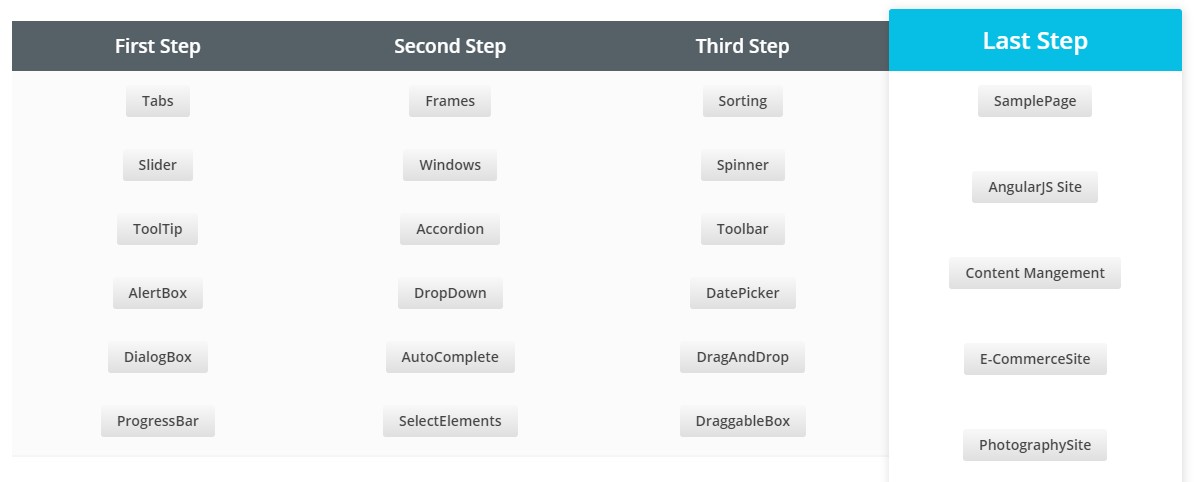
Today, everyone is inclined towards learning automation. Therefore, tester looks for website modules and visits multiple websites for automation practice. To encounter this problem, we have come up with different website modules under one roof. We developed multiple web pages and include all website components which you may get by visiting N number of websites.
You can practice Selenium, QTP, Ranorex etc scripts on this site. Try automating all simple and complex elements mentioned in this page. And if you are able to automate them then I can guarantee that you can automate any type of website.
Below is the table for the same:
Demo Site for Practice :
https://www.globalsqa.com/demo-site/
Readers might feel that there are many similar websites in the market and we totally agree with that. There is one thing which makes this testing website different from other automation practice websites that is we have covered different type of components for each category. Example : if anyone clicks on AlertBox, you will find multiple type of Alert Boxes for automation practice.
Not only this, we have seen a trend of AngularJS Website these days (It’s a complete JavaScript-based open-source front-end web application framework mainly maintained by Google). Tester started learning Protractor (Protractor is an end-to-end test framework for AngularJS applications) to automate AngularJS Application. It seems difficult to find AngulasJS website because it can’t differentiated by looking at the site. We need to see website source code or need to install some plugin to identify whether a website is developed using AngularJS or not.
Also, it’s difficult to find AngularJS Protractor automation practice website and all modules. We have come up with different AngularJS components and projects so that no one needs to search for these modules or sites. So, learn protractor to automate AngularJS website. Below is the table showing all the AngularJS modules.

AngularJS Protractor Practice Site :
https://www.globalsqa.com/angularjs-protractor-practice-site/
Before starting, please go through the links mentioned above and feel free to use these components.
If you find any bug or face any issue in the website, please send us an email at [email protected]. We will certainly take it on priority. In case, you want to us to add more things or want to share feedback, do write us.
Introduction to Selenium Webdriver
About Selenium WebDriver
WebDriver is a library the assists us in interacting with the web browser same as humans would do. It is capable of executing tests on Firefox, Chrome, Safari, Internet Explorer, Ghost Driver and Opera deployed on any of Windows, OSX or Linux platform.
List of programming language supported for scripting is big. Some of the popular languages are Java, C#, Ruby, .Net, Python and Pearl

Java seems bit friendly to me, so in this post we will use that as our scripting weapon.
Selenium Webdriver Architecture

In simple words, initially code is written in any of the programming language using the webdriver client. It interacts with the webdriver api and finally command is sent to the browser driver wherein final action is performed.
Setting Up Java_Home
- Install JDK from here
- Set JAVA_HOME environment variable.

Value of JAVA_HOME will be the path to root directory of JDK.
Installing Eclipse
- Download eclipse from here
- You will get it in zip format, so unzip it to a locattion using 7Zip, Winrar etc
- To launch eclipse, navigate to the extracted directory and double-click on eclipse.exe (On Windows) and eclipse.app (On Mac)
Creating first WebDriver project


Apply Jobs : HR Email Ids Revealed
This post is just to help Software Engineers in India to forward their resumes to HR of Top IT Companies. As you all know that we always have to login to Job Portals like Naukri, Monster, shine etc to apply to jobs and wait for companies call. Million of users are registered on these portals. When thousands of people apply to one job. There are high chances of getting your job application ignored by HR. HR also visit to these portals and filter candidate based on some skills, exp, location etc. You might be lucky one if your resume is updated and coming on the top in their filter.
Keeping all above factors in mind, we have created a list of HR Email ids. Now, you can forward your resumes directly to HR Email Ids. We couldn’t provide a list here. So, we have created an automated process. Just complete the form by clicking here and you will receive an email in few mins with Email Ids. Help us to improve our post by leaving a comment.
In case, you don’t receive an email in 15 mins. Please send us an email at [email protected]
NOTE : GlobalSQA doesn’t give any assurance of job openings in the company associated with Email Ids being shared.

When to Start Automation Testing
Before the launch of a new product in the market, testing needs to be done with the intend to launch a quality product.
Initially the product should be tested for its functional aspects which should be in line with the requirements mentioned. This testing can be achieved using the Manual Technique also known as ‘Manual Testing’.
With new enhancements’ in the product, the user has to confirm the existing functionality is working correctly. To achieve this user can perform regression which can be automated using various tools & scripts as well as it can be done manually. The technique of executing the flows using some tools or script is called as ‘Automation Testing’. This is the time when product has reached its maturity level & is stable. We can then identify and automate the flows of the product. Need of an automation is required when you want to:
– avoid repetitive tasks.
– save time.
– achieve accuracy.
– reduce cost to company.
– improve coverage
Below is the brief on Manual vs Automation testing:
Manual vs. Automation Testing
| Manual Testing | Automation Testing |
|---|---|
| Testing which is performed manual without the help of any tool is called as Manual Testing | Testing which is performed with support of tools is called Automation Testing. |
| It’s the starting phase of testing. | Unless Manual testing is performed Automation testing cannot be started. |
| It’s time consuming. | It’s faster since most of the time, tools are used. |
| Manual Testing can be used for new features to find bugs. | Automation Testing can be used for regression or checking the accuracy/stability of the existing systems. |
| No sequencing is needed. | Scripts needs to be executed sequentially mostly. |
| Can be performed only on a single machine or application at a time. | Can be performed on multiple applications or machines at a time. |
| Can be achieved by mere knowledge of application. | Knowledge of application as well as tool is necessary. |
This topic is very briefly explained and I think that we can add many points on top of this. I would like to know about reader’s view on this, as I feel this topic can be discussed and some excellent points can come up. These points can even help testers to pitch for automation tool in their own organization if you are going to introduce automation in your company.
Weapon of Software Quality : Software Testing
For companies which are into Software Development, where we constantly strive for the delivery of the product. There comes a pressure for deadlines where managers & delivery heads are focusing on the delivery of the software at stipulated dates. Engineers are focusing on delivering stable software with a better efficiency. Considerably a customer uses its product in a random manner & finds a bug buried deeply, as there is no Software Testing is done.
Then, we are projecting a bad impression on to our clients. So in the transit of deadlines and of delivering the product at times of deadline. Are we compromising on quality?
Here is the time we use our most trusted weapon: ‘Software Testing’ which will help us in achieving a quality product within a strict deadlines while making our customers happy & delighted. By testing our products we can assure that we are providing a bug free quality product within the timelines which can be achieved by using the appropriate testing methodologies.

To support that, we have come up with following Software Testing Services which will help Software Development Companies to improve quality of their software and deliver the bug free product in the market:
- Functional Testing
- Performance Testing
- Mobile Testing
- Platform and Database Testing
- Component and Unit Testing
- SOA and Web services Testing
- QA Consulting and TCOE
As per market trend, need of Software testing is gradually increasing. Every company would like to launch bug free product in the market. Lets take a look at some of the facts of Mobile Applications:
FACTS
- Having bug in Mobile Apps is one reason for uninstalling an app
- Bug in an app is one reason of bad reviews on MarketPlaces
- 60% of users will stop using your app if it doesn’t load within 3 seconds.
- 32% of users will report a negative review if they face any crash.
Therefore, many startups and SMEs have started outsourcing testing of their products to dedicated Software Testing Companies.
Endorsement Framework
Endorsement Framework
Endorsement Framework:
- Validation by a second user of an action taken on a “static data entity” (e.g. Bank) by a first user.
- Provides functionality to generate endorsement events when a User performs an action on an endorsable entity.
- Manages endorsement events while they await approval by a User.
- Examples of static data entities for which endorsement can be setup:
- Bank
- Bank User Role
- Business Calendar
- Participant
- Exchange condition
- Products
- Endorsement activation depends on a configuration file setup:
- Either all entities or no entities require endorsement
- Setup is done on the level of Bank Group
- Actions that trigger the creation of an endorsement event are:
- Creation of an entity
- Update to an entity
- Activation of an entity
- Suspension of an entity
- Deletion of an entity
- For each endorsement audit records, capturing the modifications made by the User, are created.
- The default behaviour for endorsement is to hide the modified details from the user until endorsement is done successfully.
- Each instance of an endorse-able entity has an endorsement status:.
- Pending endorsement for Modification
- Pending endorsement for Deletion
- Pending endorsement for Creation
- Pending endorsement for Suspension
- Pending endorsement for Activation
- No Endorsement outstanding
- Only a single active endorsement event can be pending against an entity.

Warehouse
Warehouse
Warehouse:
- The processing of some transactions must be split in two steps.
- This typically applies to Transactions that are received before the day they are executed.
- Some validations are performed the day the Transaction is received, to make sure it is valid.
- Extra validations are performed the day the Transaction is executed, for instance, to make sure the account still exists, or funds are available.
- Based on the Exchange Timings computed by the router, and on the type of Transaction, the system determines if the Transaction must be held or not.